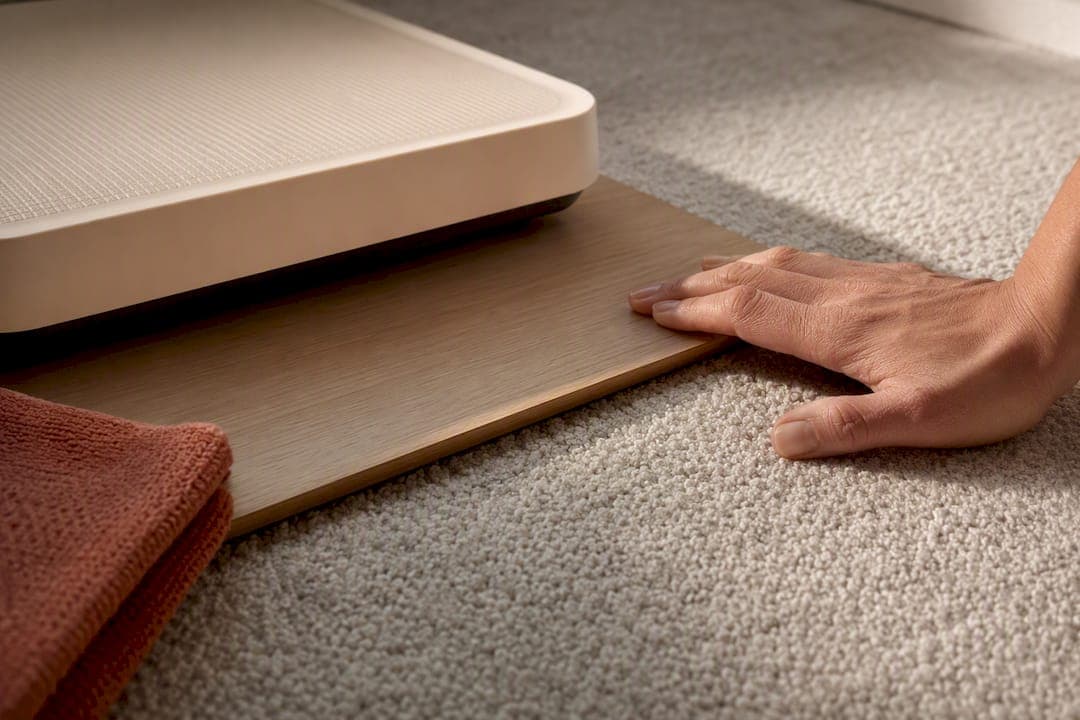
You can put a scale on carpet and it will absolutely give you a reading, but that reading is often wrong by a few pounds, sometimes significantly. The fix takes thirty seconds: set the scale on a rigid board or move it to a hard floor before you step on. If you own a smart scale, unstable footing hurts the body-composition numbers even more than the weight itself.
TL;DR:
- Using a rigid board or hard floor surface can improve the accuracy of weight readings on carpet by preventing the scale's platform from flexing.
- Thick, plush carpets with heavy padding tend to significantly distort both analog and digital scale measurements, with errors up to 10 pounds or more.
- Testing your scale with a known weight on different surfaces can reveal whether your setup keeps readings within half a pound of true weight.
- Body composition measurements are highly sensitive to surface instability, as uneven force transmission on carpet can skew impedance-based data like body fat percentage.
- Consistently placing your scale on a stable, hard surface and weighing barefoot every time helps reduce variability and ensures more reliable long-term tracking.
Table of Contents
- Practical Fixes to Get Accurate Readings on Carpet
- Why Carpet Changes What Your Scale Reads
- How to Test and Verify Your Scale's Accuracy
- Why Surface Stability Matters Even More for Body-Composition Metrics
- Author's Perspective: What Consistency Actually Buys You
- A Dependable Scale Still Needs a Dependable Base
- Sources
Practical Fixes to Get Accurate Readings on Carpet
The fastest fix is also the most obvious one: find a patch of hard floor. A kitchen or bathroom tile takes ten seconds and solves the whole problem without spending a cent. But if your only weighing spot is the bedroom carpet, you need a workaround that gives the scale the flat, unyielding surface it was built for.
Start with a rigid board. A piece of plywood or MDF thick enough to prevent flexing keeps the scale's platform from flexing into the carpet pile underneath. A large ceramic tile works too, as long as it's a bit bigger than the scale's footprint on every side. The goal is simple: nothing should sink, tilt, or rock when you step on.
Carpet trays and screw-in "carpet feet" are the commercial version of the same idea. Some manufacturers sell accessory trays built specifically to sit under a scale on low-pile carpet. They work reasonably well on thin, tightly woven carpet. On thick, plush carpet with heavy padding underneath, though, even a tray can flex slightly, so a rigid board or hard floor still wins.
A few things to check once your board or tray is in place:
- Confirm the board doesn't rock or bow when you shift your weight from foot to foot.
- Add a thin non-slip pad or strip of anti-slip tape under the board so it can't slide on the carpet.
- Make sure the scale sits flat on the board, not balanced on a lump or uneven fiber patch.
- Recheck the setup every few weeks. Carpet pile compresses over time and can shift how the board sits.
Pro Tip: Keep the same board in the same spot permanently. Moving it room to room reintroduces the exact inconsistency you're trying to eliminate.
Why Carpet Changes What Your Scale Reads
Old-style analog scales rely on springs and levers under a metal platform. Carpet fibers and padding act like a second, softer spring stacked underneath the scale's own mechanism. That extra give shifts the fulcrum geometry just enough to distort the reading. Digital scales work differently but aren't immune. Inside, load cells (strain gauges bonded to a metal frame) measure how much the frame bends under your weight. That measurement only works correctly when the force travels straight down through all four sensors evenly. Carpet absorbs part of that downward pressure unevenly, so the force gets shunted off-axis before it ever reaches the sensor.
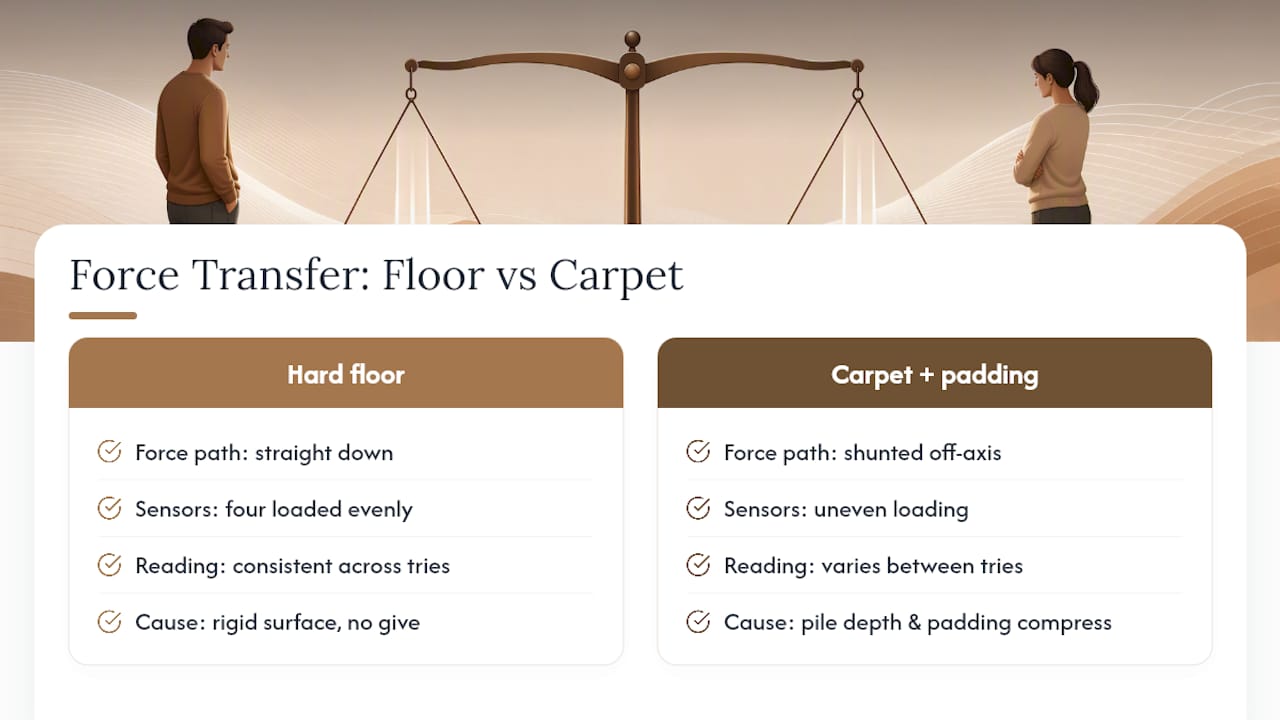
That's why the same scale in the same spot can give you three different numbers in three tries: pile depth varies across a rug, padding compresses differently depending on foot placement, and even a half-inch shift in where the scale sits changes the result.
The size of this effect is bigger than most people expect. Experimental testing reported by New Scientist found analog scales reading noticeably higher on thick shag-style carpet, purely from the change in lever geometry. Digital scales generally show smaller swings, but they're far from immune, and error patterns compound in rooms with thick padding under the carpet, not just the carpet itself.
How to Test and Verify Your Scale's Accuracy
You don't need a lab to find out how much your carpet is skewing your numbers. A known-weight object and five minutes will tell you everything.
- Grab something with a fixed, known weight, a 10 pound dumbbell or a bagged 5 pound flour sack works fine.
- Weigh it on a hard floor first and write down the number. This is your control reading.
- Weigh the same object directly on the carpet, no board, and record that number.
- Weigh it again on carpet with your rigid board or tray underneath.
- Repeat each surface two or three times and average the results, since a single reading can be noisy on its own.
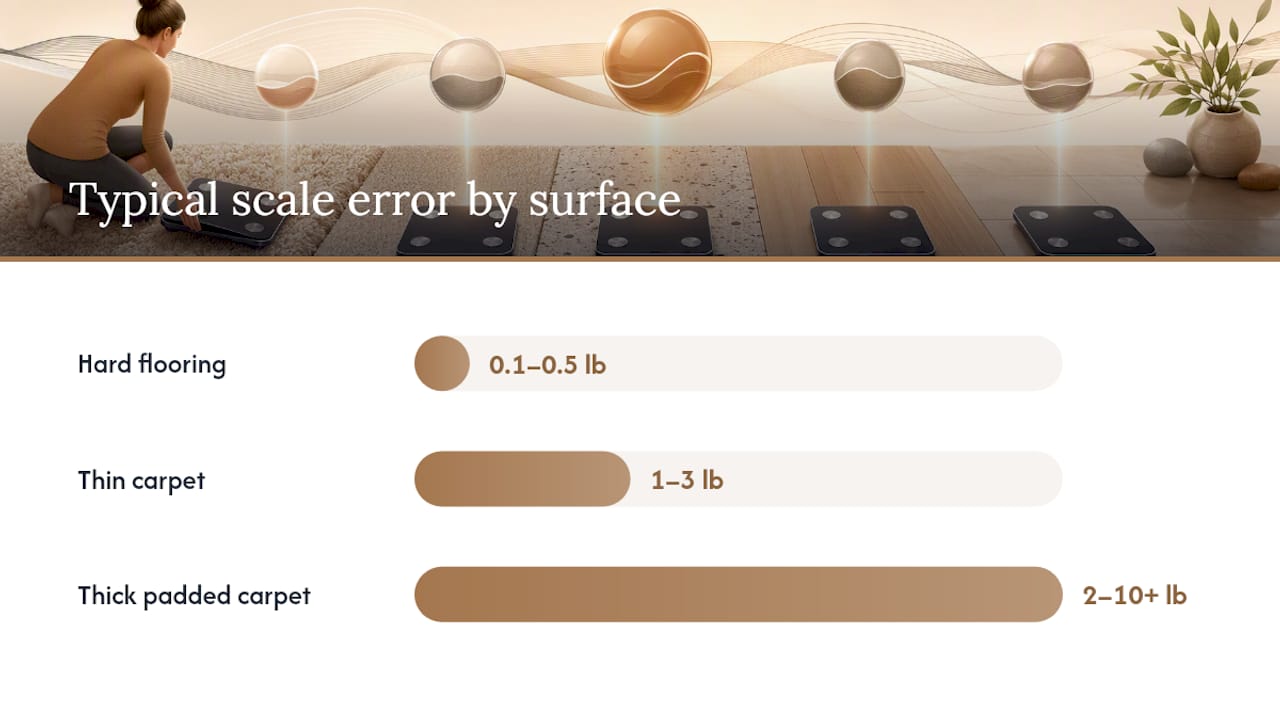
Consumer testing on this exact method has found typical error ranges by surface: roughly 0.1 to 0.5 pounds off on hard flooring, 1 to 3 pounds off on thin carpet, and anywhere from 2 to 10 or more pounds off on thick, padded carpet. If your board setup brings the carpet reading within about a half pound of your hard-floor control, you're good. If it doesn't, the board is too thin, too small, or resting unevenly.
Before you test, zero out the scale and check the batteries. Weak batteries produce sluggish, unreliable readings that have nothing to do with the floor.
Pro Tip: If your scale still swings by more than a pound or two even on a rigid board over hard flooring, that's a sensor problem, not a carpet problem, and it's time to contact the manufacturer.
Why Surface Stability Matters Even More for Body-Composition Metrics
A body-composition scale sends a faint electrical current up through one foot and back down through the other, a method called bioelectrical impedance. It only works when both feet make firm, flat contact with the metal electrodes at the same time, with consistent pressure. Carpet gets in the way of that in two ways at once: it lets the scale rock slightly as you shift your weight, and it can throw off the amount of downward force each foot delivers to the electrode plate.
Uneven electrode contact doesn't just nudge the weight number. Because body fat percentage and BMI are both calculated from that same impedance signal, a shaky reading skews those numbers too, sometimes noticeably. Manufacturer manuals across the smart-scale category consistently instruct users to place the device on a flat, hard surface and stand barefoot, not on socks or carpet.
A dependable setup routine looks like this:
- Weigh in barefoot, every time, since socks and carpet both interfere with the electrical signal.
- Set the scale on a hard floor or rigid board, never directly on carpet or a rug.
- Stand still for the full few seconds of the reading instead of shifting weight mid-measurement.
- Check for a firmware update occasionally. Some models refine impedance calculations over time.
Author's Perspective: What Consistency Actually Buys You
Chasing a single perfect number is the wrong goal. What matters is weighing yourself the same way, same time of day, same surface, same scale, so the noise from carpet, hydration, or last night's dinner cancels out over a week. Look at a rolling weekly average instead of any one morning's reading, and daily fluctuations of a pound or two stop feeling like a crisis.
Most of the frustration people bring to their bathroom scale isn't about the device. It's about expecting daily precision from a tool that's only meaningful over time.
— Jacob
A Dependable Scale Still Needs a Dependable Base
The Smart Electronic Weight Scale is built around high-precision sensors specifically because small setup mistakes, carpet included, can throw off body-composition math more than plain weight. It has been positively reviewed by many customers, and the design goal was to provide a scale accurate enough that the only variable left to control is where it is placed.

Getting reliable numbers out of any smart scale, Uvirello's included, comes down to a short setup routine every time:
- Place it on hard flooring or a rigid board, never bare carpet.
- Step on barefoot for a clean impedance reading.
- Let it auto-calibrate on the first use on a new surface.
- Check the battery level if numbers start drifting.
- Keep your Wi-Fi connection steady so your history syncs without gaps.
No scale, however precise its sensors, can compensate for a wobbly base. Pair Uvirello's Smart Electronic Weight Scale with the fixes above, and you get a setup built to hold up over months of tracking, not just a single lucky morning.
Sources
- Rip up the shag pile if you want to lose weight | New Scientist
- Do Scales Work on Carpet? Exploring accuracy and performance – Carpet Reviewed