
A personal health record (PHR) is an electronic, patient-controlled record of your health information — owned and managed by you, not your doctor or hospital. Unlike the records your provider keeps, a PHR travels with you across every clinic, specialist, and emergency room you ever visit. To get started: request copies of your records under HIPAA, then consolidate them in a secure PHR app or patient portal.
At a glance:
- A PHR holds medications, allergies, diagnoses, immunizations, lab results, and patient-generated data like weight or blood pressure
- You control who sees it, where it lives, and what gets added
- First action: contact your provider's health information management department and request an authorization for release of your records
Table of Contents
- What is a personal health record and what defines it?
- How does a PHR differ from an EHR and a patient portal?
- What types of PHRs are available to you?
- What should you store in your PHR?
- Why keeping a PHR genuinely improves your care
- Privacy, security, and your U.S. legal rights with a PHR
- How to create and maintain your PHR step by step
- How to share your PHR and what clinicians can actually use
- When a PHR may not be enough
- Adding smart scale body-composition data to your PHR
- Key Takeaways
- The case for taking your health records seriously
- Authoritative sources and where to read more
What is a personal health record and what defines it?
AHIMA defines a PHR as a lifelong, electronic resource of health information owned, managed, and controlled by the individual patient rather than a healthcare institution. That single word — owned — is what separates a PHR from every other record in the healthcare system.
Your doctor's office keeps an Electronic Health Record (EHR) about you. Your hospital keeps one too. Neither of those is yours to edit, annotate, or carry to a new provider without formally requesting a copy. A PHR flips that dynamic entirely.
The core features that define a true PHR:
- Patient ownership: You create it, maintain it, and decide who accesses it
- Portability: It moves with you across providers, states, and health systems
- Lifetime scope: It's designed to span your entire health history, not just one episode of care
- Patient-generated data: You can add home readings, symptom notes, and device metrics that no clinician ever recorded
- Sharing controls: You grant and revoke access on your own terms
A typical PHR entry might look like this: a medication list showing lisinopril 10 mg daily for hypertension, a documented penicillin allergy with reaction type noted, and a recent HbA1c result of 6.4% from a lab visit last March. That combination, in one place, is something no single provider's EHR is likely to hold for you automatically.
"A PHR helps patients understand, advocate for, and manage their care — making patients experts on themselves by consolidating information and simplifying sharing with providers and caregivers." — ONC, Office of the National Coordinator for Health IT
Mayo Clinic and the University of Minnesota's Taking Charge of Your Wellbeing program both frame PHRs as the connective tissue between fragmented provider records — the one document that actually follows the patient.
How does a PHR differ from an EHR and a patient portal?
These three systems get confused constantly, and the confusion has real consequences. Using a patient portal as if it were a portable PHR, for example, can leave you without critical records when you switch health systems.
| Dimension | PHR | EHR | Patient Portal |
|---|---|---|---|
| Owner / custodian | You | Your provider or hospital | Your provider (you get a view) |
| Portability | Fully portable | Stays with the institution | Tied to one health system |
| Primary use | Personal tracking, care coordination | Clinical documentation, billing | Messaging, scheduling, results viewing |
| Data entry source | Patient + imported records | Clinicians only | Read-only for patients (mostly) |
| Legal medical record | No | Yes | No |
Patient portals like MyChart are often called "tethered PHRs" because they give you a window into your provider's EHR. They're genuinely useful for messaging your care team, viewing recent lab results, and scheduling appointments. The catch: when you leave that health system, your portal access typically ends, and the data doesn't automatically follow you.
When to rely on each:
- Emergency room visit: A portable PHR with your current meds and allergies is faster and more reliable than hoping the ER can pull your records from another system
- Specialist transfer: An EHR-generated summary (like a Continuity of Care Document) is the official record, but your PHR fills in gaps the specialist's system won't have
- Longitudinal tracking: Neither an EHR nor a portal captures six months of home blood pressure readings or weekly weight trends — that's where a PHR built around patient-generated data earns its keep
What types of PHRs are available to you?
Research published in PMC classifies PHR systems into three main architectures, each with distinct trade-offs.

Tethered PHRs connect directly to a provider's EHR. MyChart, the patient portal used by many major health systems, is the most widely recognized example. Strengths include real-time access to clinical notes, lab results, and secure messaging with your care team. The limitation is portability: the data lives inside one health system's infrastructure.
Untethered PHRs operate independently of any provider. These include standalone mobile apps, secure cloud folders, and even well-organized digital files. They're more flexible for long-term tracking and work across every provider you see, but they require you to manually import or enter records. An interconnected fitness tracking workflow can make that process significantly less tedious.
Interconnected (hybrid) PHRs pull data from multiple sources — provider portals, wearables, lab systems — into a single unified record. Apple Health Records is the most prominent U.S. example: it can aggregate data from participating hospitals, pharmacies, and connected devices in one place. This architecture is the interoperability ideal, though it depends on your providers supporting the relevant data standards.
Which type fits you depends on one question: do you see mostly one health system, or do you move across multiple providers? If it's the former, a tethered portal may cover most of your needs. If it's the latter, an untethered or hybrid approach gives you the control you actually need.
What should you store in your PHR?
A PHR is only as useful as what's in it. Here's a practical breakdown of what belongs there.
Clinical records:
| Category | What to include |
|---|---|
| Contact info | Your name, DOB, insurance, emergency contacts |
| Providers | Names, specialties, phone numbers, NPI numbers |
| Medications | Drug name, dose, frequency, prescribing provider, start date |
| Allergies | Substance, reaction type, severity |
| Diagnoses | Condition, date of diagnosis, current status |
| Procedures | Surgery or procedure name, date, facility, outcome notes |
| Immunizations | Vaccine name, date, lot number, administering provider |
| Lab results | Test name, value, reference range, date |
| Imaging reports | Study type, date, facility, key findings |
| Advance directives | Living will, healthcare proxy, DNR status |
Patient-generated data is where a PHR becomes something no EHR can replicate. Mayo Clinic notes that home-monitoring metrics like blood pressure readings and weight trends give clinicians a far more complete picture of your health between appointments. Add:
- Home blood pressure logs (date, time, systolic/diastolic, device used)
- Weight and body composition metrics (body fat percentage, BMI, lean mass)
- Glucose readings for people managing diabetes
- Exercise logs, sleep data, and symptom diaries
Pro Tip: For emergency access, keep a one-page summary at the front of your PHR: current medications with doses, known allergies with reaction types, implanted devices (pacemaker, stent), emergency contacts, and your advance directive status. An ER physician can act on that page in under two minutes.
For attachments, store PDFs of lab reports and imaging, scanned consent forms, and photos of surgical scars or skin conditions when relevant. Consistent file naming (YYYY-MM-DD_LabName_TestType) makes retrieval fast under pressure.
Why keeping a PHR genuinely improves your care
The personal health record benefits go beyond convenience. They change the quality of clinical conversations and reduce the friction that causes medical errors.
For patients:
- Continuity across providers: a new specialist sees your full history, not just what their system happens to have
- Fewer repeat tests: when you can show a recent lab result, your provider doesn't need to reorder it
- Better chronic disease management: tracking trends in blood pressure, weight, or glucose over months reveals patterns a single office visit never could
- Faster, more accurate visits: arriving with a current medication list cuts the intake process significantly
For clinicians:
Clinicians value well-documented patient-generated trend data because it enables data-driven conversations and more efficient visits. A patient who walks in with six months of morning blood pressure readings gives their cardiologist something genuinely useful — not just a single in-office reading taken after a stressful commute.
ONC frames PHRs as an empowerment tool: consolidating information helps patients advocate for better care and ensures providers see the full picture. That framing matters because it shifts the dynamic from passive recipient to active participant.
An umbrella review published in the Journal of Public Health found associations between portal messaging and improved medication management, visit regularity, and certain biometric outcomes — though results varied by study design and patient demographics. The evidence is promising, not conclusive, which is worth knowing before treating a PHR as a guaranteed health intervention.
Privacy, security, and your U.S. legal rights with a PHR
Your HIPAA rights
Under the HIPAA Privacy Rule, you have the right to request copies of your medical records from any covered healthcare provider. Providers must respond within 30 days, and they may charge a reasonable cost-based fee for copies. That right is the legal foundation for building a PHR.
The gap most people miss
HIPAA protects records held by covered entities: hospitals, clinics, insurers, and their business associates. It does not automatically protect data you move into a third-party PHR app. Once your health information lives in an app that isn't a covered entity, that app's privacy policy, not HIPAA, governs what happens to your data.
"If you store PHR data in third-party apps, prioritize services that clearly state whether data is stored locally or on company servers and whether the app will sell or share personal health information." — ONC / HealthIT.gov
This matters because some consumer health apps monetize user data through advertising partnerships or data licensing. Reading the privacy policy before you enter a single diagnosis is not optional.
Security checklist for choosing a PHR tool
- End-to-end encryption for data in transit and at rest
- Clear statement on local vs. server storage
- Explicit policy on whether the developer can access or sell your data
- Export capability (you should be able to get your data out)
- Two-factor authentication
- Readable, plain-language privacy policy
For deeper guidance on protecting your health data, data privacy in health tracking covers the specific risks and safeguards worth understanding before choosing a tool.
Pro Tip: Maintain a "base" record in a stable format — a secure cloud folder or structured file — so you retain control if an app changes its privacy policy or shuts down. Apps come and go; your health history doesn't.
How to create and maintain your PHR step by step
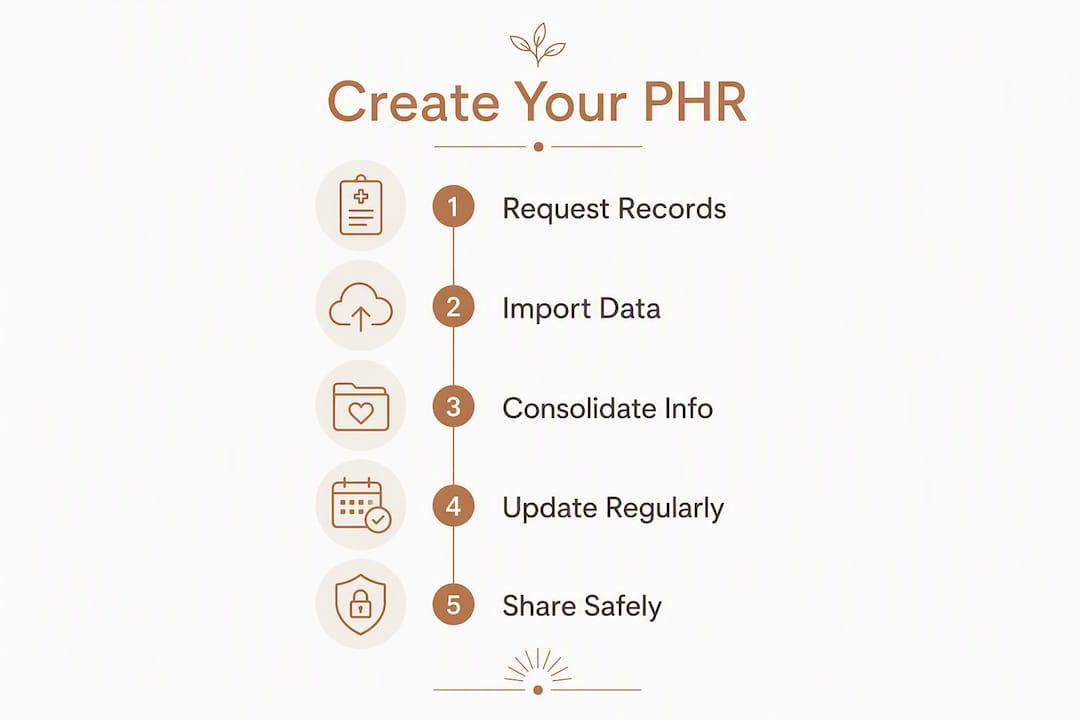
Step 1: Request your records
Contact the health information management department at each provider you've seen. Ask for an "authorization for release of medical records." URMC's guidance confirms this is the standard process at most hospitals. Expect a turnaround of a few days to a few weeks; some providers now offer instant digital downloads through their patient portals.
Step 2: Choose your storage method
Three practical options:
- Patient portal (tethered): Best if you use one primary health system and want automatic updates
- Mobile PHR app: Best for portability and integrating device data; verify privacy terms first
- Secure cloud folder: Best for full control; requires manual organization but never locks you into a vendor
Step 3: Import and consolidate
Use Blue Button technology where available — it's a standardized download format supported by Medicare, the VA, and many major health systems that lets you pull structured health data directly into compatible apps. For records that only come as PDFs, scan and file them by date and category.
Step 4: Keep it current
Schedule a quarterly review: add new diagnoses, update your medication list after any prescription changes, and request copies of any labs or imaging ordered since your last update. After a hospitalization or surgery, request the discharge summary within two weeks while the details are still fresh.
Step 5: Share safely
Most clinicians accept a printed medication list and allergy summary for routine visits. For specialist referrals or care transfers, a CCDA (Continuity of Care Document) export from your portal is the most interoperable format. Ask your provider's office what format they prefer before your appointment.
Checklist for choosing a digital PHR tool:
- Privacy policy is readable and states data use explicitly
- Supports export in standard formats (Blue Button, FHIR, CCDA)
- Two-factor authentication available
- Clear encryption standards stated
- Cost is transparent (free tier limitations, subscription terms)
How to share your PHR and what clinicians can actually use
The formats that matter
Three standards underpin health data exchange in the U.S.:
- FHIR (Fast Healthcare Interoperability Resources): The current federal standard for API-based health data exchange; Apple Health Records uses it to pull data from participating hospitals
- CCDA (Consolidated Clinical Document Architecture): An XML-based document format for structured clinical summaries; most EHRs can generate and import a CCDA
- Blue Button: A consumer-facing download standard, often built on FHIR, that lets patients export their data from Medicare, the VA, and many commercial insurers
Sharing methods in practice
- Secure portal messaging: Attach a summary document directly in your patient portal message to your care team
- PDF export: Universally readable; best for printed summaries or faxed referrals
- App-to-provider data exchange: Requires both sides to support the same standard; ask your provider's office before assuming this works
- Encrypted email: Use only when your provider explicitly accepts it and your email client supports end-to-end encryption
Pro Tip: For any appointment, bring two things: a one-page summary (current meds, allergies, active conditions) that the clinician can scan in 30 seconds, and a full export or trend chart for deeper review. A six-month weight or blood pressure trend printed from your PHR often tells a clinician more than the visit itself.
When a PHR may not be enough
A PHR is powerful, but it has real limits worth knowing before you rely on it in a high-stakes situation.
Common gaps:
- Provider EHRs and portals are often siloed. Results from a specialist, an urgent care visit, or an ER stay may not automatically appear in your primary care portal. BetterHealthWhileAging advises explicitly requesting lab and radiology reports at every visit rather than assuming they'll transfer
- Format incompatibilities can make structured data from one system unreadable in another
- User-entry errors: if you type your own medication list, transcription mistakes happen. Verify critical entries against official prescription labels or pharmacy records
- A PHR is not a legal medical record. For insurance disputes, disability claims, or legal proceedings, you need certified copies from the originating provider
For high-stakes scenarios — surgery, care transfer, legal needs:
- Confirm your medication list with your pharmacist, not just your own notes
- Request official certified copies of operative reports, pathology results, and imaging studies
- Verify implanted device details (model number, serial number) with the implanting facility
- Confirm your advance directive is on file with your current providers, not just stored in your PHR
Adding smart scale body-composition data to your PHR
Here's a concrete example of how patient-generated device data fits into a PHR and improves clinical conversations.
A person managing their weight after a metabolic syndrome diagnosis starts logging weekly body-composition readings from a smart scale into their PHR. Over 12 weeks, the log shows body fat percentage dropping from 34% to 31% while lean mass holds steady — a pattern that tells their physician the weight loss is coming from fat, not muscle. That trend chart, shared at a follow-up visit, changes the conversation from "you've lost 8 pounds" to "your body composition is shifting in the right direction."
A practical PHR entry template for device readings:
- Date: 2026-03-15
- Device: Smart electronic weight scale (Uvirello)
- Reading: Weight 182.4 lbs / Body fat 31.2% / BMI 26.1
- Context: Morning, fasted, minimal clothing, same floor position as prior readings
- Notes: Started resistance training program two weeks prior; no medication changes
Consistency is what makes this data clinically useful. A reading taken at different times of day, after different meals, or on different surfaces introduces variability that obscures real trends. Tracking trends rather than single readings is the principle that turns a scale into a health tool.
Pro Tip: Weigh yourself at the same time each morning, after using the bathroom and before eating, wearing the same amount of clothing, and place the scale on the same hard floor surface every time. That consistency makes a 12-week trend from the Uvirello Smart Electronic Weight Scale meaningful enough to share with a clinician.
The weekly fitness tracking best practices guide covers measurement consistency in more detail if you want to build a reliable logging habit from day one.
Key Takeaways
A personal health record is the only health document you fully own, and its value scales directly with how consistently and completely you maintain it.
| Point | Details |
|---|---|
| PHR definition | A PHR is a patient-owned electronic record, distinct from provider-held EHRs and limited-portability patient portals. |
| HIPAA access rights | You have a legal right under HIPAA to request copies of your records from any covered provider within 30 days. |
| Privacy gap | HIPAA does not protect data in third-party PHR apps; always verify encryption, storage location, and data-sharing policies before use. |
| Patient-generated data | Home metrics like body composition trends add clinical value that no EHR captures; consistent measurement makes the data meaningful. |
| First action | Request your most recent lab results and current medication list from your provider today, then consolidate them in a secure tool. |
The case for taking your health records seriously
Most people don't think about their health records until they're sitting in an ER, a specialist's waiting room, or a disability hearing — and suddenly realize they can't answer basic questions about their own medical history. That gap is entirely preventable, and a PHR is the fix.
What strikes me most about the PHR concept is how much clinical value gets lost simply because patients don't know they can ask for their own records. HIPAA gives you that right explicitly. Most providers will hand over a structured digital export if you ask for one. The barrier isn't legal or technical — it's awareness.
The body-composition example in this article isn't a stretch. Clinicians genuinely respond differently to a patient who walks in with a 90-day trend chart versus one who says "I think I've lost some weight." Longitudinal data changes the conversation, and a PHR is the only place that data reliably lives.
Start small: request your most recent lab panel, add your current medications, and store both in a secure location you control. That's a functional PHR. Everything else — device data, imaging reports, advance directives — builds from there.
Authoritative sources and where to read more
-
ONC / HealthIT.gov — Get It, Check It, Use It — The federal government's consumer guide to PHRs, covering HIPAA rights, Blue Button downloads, and app selection criteria. Start here for policy and practical steps.
-
Mayo Clinic — Personal Health Records and Patient Portals — A clinical overview of what PHRs contain, how patient portals compare, and why patient-generated data matters to clinicians.
-
AHIMA — Defining the Personal Health Record — The professional health information management association's foundational definition of PHRs and their distinction from EHRs.
-
PMC / NCBI — Utility, Value, and Benefits of Contemporary PHRs (Integrative Review) — A peer-reviewed synthesis of PHR functions, the tethered/untethered/interconnected taxonomy, and evidence on patient outcomes.
-
URMC — Maintaining Your Personal Health Record — A hospital-produced how-to guide covering the records-request process and practical PHR maintenance steps.
-
BetterHealthWhileAging — How to Use a Personal Health Record — Practical consumer guidance on filling gaps in PHR data, explicitly requesting lab and imaging reports, and maintaining a base record across app changes.